
As was explained in the introduction, tide predictions for a given location cannot be conjured out of the void—you need to get some special data for each and every location for which you want to predict tides. XTide reads these data from harmonics files.
The harmonics file available at https://flaterco.com/xtide/files.html#harmonicsfiles contains all data for U.S. stations that were available from the NOS web site as of the last update. I update it once a year.
For various reasons, I no longer maintain data for stations outside the U.S. Methods by which non-U.S. stations or unsupported U.S. stations can be added are described below; but first, some important definitions.
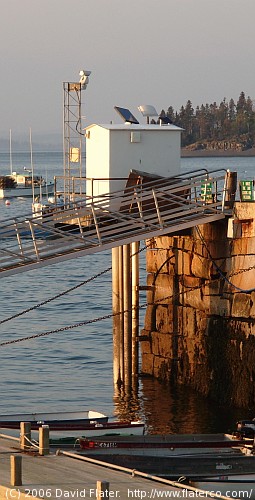
Harmonic constants are created by analysis of regular water level readings taken by automated tide stations like the one pictured here. A tide station whose predictions trace directly to harmonic constants that were derived from water level readings for that same station is called a reference station.
A set of harmonic constants provides an amplitude and a phase (or "epoch") for various harmonic constituents with names like M2 and K1. The number of constituents used for a given station can vary from a few to over 100. However, if you get six or fewer constituents then you are probably dealing with "simplified" harmonic constants. Simplified harmonic constants limit the accuracy that can be achieved for predictions because the less significant constituents have been thrown away. If simplified harmonic constants must be used, it is a good idea to enable constituent inference in XTide.
Some Admiralty data include nonharmonic adjustments that are not supported by XTide. A spreadsheet has been contributed to convert Admiralty seasonal corrections to approximate long-term constituents that XTide can use. However, for "S.W. CORRECTIONS" (shallow water corrections) called f4 and f6 there really is no support yet.
A subordinate station is a tide station whose predictions are obtained by applying corrections to the predictions generated for a reference station, i.e., a station for which we have good harmonic constants. The words 'corrections,' 'differences,' and 'offsets' are used interchangeably when referring to subordinate station data.
While harmonic constants can be hard to get, you should be able to get offsets with relative ease from a local boating magazine, chartbook, yacht club, or marine authority.
There are many different flavors of offsets for subordinate stations. At this time, XTide supports all commonly appearing flavors except for the Admiralty one that has different height differences depending on the time of month. The following rare and freakish sorts are not supported: those that use different offsets depending on whether the flood at the reference station crossed some threshold; those that rely on more than one reference station; those that use different offsets for higher high or low water versus lower high or low water; currents that use a regular tide station as reference, or vice-versa.
Some putative sets of harmonic constants for subordinate stations were created by mangling the constants of a reference station to approximate the results of applying corrections. Such mangled data only junk up the database and should be avoided.
If you find suitable offsets, you can add them to harmonics.tcd using the tideEditor program available from https://flaterco.com/xtide/files.html#extras. There are two other ways to do it, as described below under "Importing batches of harmonic constants and offsets," but tideEditor is most expedient for the non-expert.
First, always make a backup copy of whatever you are about to modify.
TideEditor version 1.4 takes the name of the file to modify as the command-line argument.
bash-3.1$ tideEditor whatever.tcd
When you start tideEditor, you get a map of the world. Point at the location where you want to add a subordinate station and right click.
You will get a prompt asking "Will the new station be a reference station or a subordinate station?" Choose Subordinate.
You will get a prompt saying "Please select the new reference station." Use the pull-down list to select the reference station and click OK.
You will then get a window with the tabs General, Verbiage and Offsets, initially showing General. On the General tab, the Reference Station, Latitude and Longitude fields will be pre-filled based on your previous actions. If you don't know the correct latitude and longitude, just estimate the coordinates as best you can.
The other fields that you MUST fill in are as follows:
All other fields on the General and Verbiage tabs are
optional. Descriptions of the other fields are obtainable using
the question mark tool thingy ( ).
).
The Offsets tab has the following fields.
Notations used to describe corrections will vary:
| Notation | Translation |
|---|---|
| −0:20 | Time Add −20 |
| 1 23 | Time Add 123 |
| *1.07 | Level Multiply 1.07 |
| +0.4 | Level Add 0.4 |
| (*0.65+0.3) | Level Multiply 0.65, Level Add 0.3 |
If you were not given separate corrections for max and min, set both the max and min values to whatever you got. For example, if you get
Head Harbor, Isle au Haut -0:20 (Portland)
then you should set both Minimum Tide Add and Maximum Time Add to −20.
Special cases:
When finished, click OK. When you quit tideEditor, your new station will be saved in the updated TCD file.
To add a reference station with tideEditor, the general process is similar to adding a subordinate station, but the data to enter are more obscure and there are more opportunities for the non-expert to get stuck.
When you get the prompt asking "Will the new station be a reference station or a subordinate station?" choose Reference.
Instead of "Offsets," the third tab in the dialog is now "Constituents."
All pretense of user-friendliness stops here. If you want to do large numbers of stations without lots of manual data entry, you have two options, both of which require a higher level of computer literacy than is demanded by tideEditor.
Anyone with a Linux PC, enough determination to install Octave, enough skill to convert data from one format to another, and enough data—at least a year's worth of hourly water level measurements—should be able to derive harmonic constants using the Harmgen package. Harmgen produces results in the form of an SQL insert statement that loads the new station into Harmbase 2 using XTide's constituent naming scheme. Those with sufficient background and a reason to do it can change the constituent set, but the new constituent definitions must be harmonized between Harmbase and Harmgen.
There is no added complication from multi-year time serieses. Harmgen accounts for the equilibrium arguments and node factors for each year and minimizes the error across the entire span of the time series.
Under the best of circumstances, predictions from harmonic constants derived this way can be expected to differ from authoritative predictions by 20 minutes or so. But if the authorities are using a nonharmonic method of tide prediction—or if you messed up—the discrepancies could be worse. It is up to you to do quality assurance.
Details on the operation of Harmgen can be found in that package's README file.
This list is probably neither complete nor current. These are just the data sources that have been brought to my attention.
Harmonic constants:
Water level data: